
 English
 العربية
 Čeština
 Dansk
Dansk
 Deutsch
 Español
 Suomi
Suomi
 Français
 Bahasa Indonesia
 Italiano
 日本語
日本語
 한국어
한국어
 Nederlands
 Polski
 Português
 Română
 Русский
 Svenska
 Türkçe
 Tiếng Việt
 简体中文
简体中文
Htaccess Redirect Generator
Generate Clean, Secure & SEO-Optimized .htaccess Redirect Rules in Seconds





Website redirects are a critical part of managing a healthy, search-engine-friendly website. Whether you are migrating a site, changing URLs, fixing broken links, or moving from HTTP to HTTPS, redirects ensure that both users and search engines reach the correct destination without errors.
The challenge is that redirect rules—especially those written in .htaccess—can be confusing and error-prone for beginners. A single mistake in syntax can break your entire website. This is where the Htaccess Redirect Generator by SmallWebTools becomes invaluable.
This powerful yet simple tool allows you to generate accurate .htaccess redirect rules without technical knowledge. In this in-depth guide, you’ll learn what .htaccess redirects are, why they matter for SEO, how the Htaccess Redirect Generator works, and how to use it effectively with a real-world example.
What Is .htaccess?
.htaccess (short for hypertext access) is a configuration file used by Apache web servers. It allows website owners to control server behavior without editing the main server configuration files.
Using .htaccess, you can:
-
Create URL redirects
-
Enforce HTTPS
-
Control www / non-www versions
-
Improve website security
-
Handle custom error pages
-
Manage caching and compression
Among these, redirects are the most common and SEO-critical use case.
What Is a Redirect?
A redirect is a method of forwarding users and search engines from one URL to another automatically.
For example:
-
Old URL:
http://example.com/page-old -
New URL:
https://example.com/page-new
Without a redirect, visitors see an error page. With a redirect, traffic flows smoothly to the new location.
Why Redirects Are Important for SEO
Redirects play a vital role in maintaining search engine rankings and user experience.
1. Preserve SEO Value
Correct redirects (especially 301 redirects) pass most of the link equity from old URLs to new ones.
2. Prevent 404 Errors
Broken links harm user experience and SEO. Redirects fix them instantly.
3. Support Website Migrations
When changing domains or URL structures, redirects ensure search engines understand the changes.
4. Improve User Experience
Visitors are automatically taken to the correct page without confusion.
Types of Redirects Explained
Understanding redirect types helps you choose the right option.
301 Redirect (Permanent)
-
Signals a permanent URL change
-
Passes SEO value
-
Best for SEO
302 Redirect (Temporary)
-
Signals a temporary move
-
SEO value is not fully transferred
-
Used for short-term changes
307 Redirect
-
Modern HTTP temporary redirect
-
Less common in
.htaccessusage
The Htaccess Redirect Generator mainly focuses on SEO-friendly 301 and 302 redirects.
What Is an Htaccess Redirect Generator?
An Htaccess Redirect Generator is an online tool that automatically creates .htaccess redirect rules based on user input.
Instead of manually writing Apache rewrite rules, you simply:
-
Choose redirect type
-
Enter source and destination URLs
-
Generate ready-to-use code
The SmallWebTools Htaccess Redirect Generator removes technical complexity and minimizes errors.
How the Htaccess Redirect Generator Works
The process is simple and efficient:
-
Select the redirect type (301 or 302)
-
Enter the old URL or path
-
Enter the new destination URL
-
Choose redirect options (www, non-www, HTTPS, etc.)
-
Generate
.htaccesscode -
Copy and paste into your
.htaccessfile
No Apache knowledge required.
Common Redirect Rules Generated by the Tool
1. Single Page Redirect
Redirect one URL to another.
2. Domain Redirect
Redirect an entire domain to a new domain.
3. HTTP to HTTPS Redirect
Force secure HTTPS connections.
4. www to non-www Redirect
Ensure only one version of your site is accessible.
5. non-www to www Redirect
The opposite of the above.
These are all essential for SEO consistency.
Why Use the SmallWebTools Htaccess Redirect Generator
The SmallWebTools tool offers multiple advantages:
-
Completely free
-
No login required
-
Beginner-friendly interface
-
Clean and accurate
.htaccessrules -
SEO-optimized redirects
-
Prevents syntax errors
-
Works for Apache servers
It saves time and avoids costly mistakes.
SEO Benefits of Using Proper Redirects
Correct redirects help with:
-
Maintaining keyword rankings
-
Preserving backlinks
-
Reducing crawl errors
-
Improving crawl efficiency
-
Enhancing user trust
Poor redirect implementation can damage SEO, which is why a generator is essential.
Common Redirect Mistakes the Tool Helps Avoid
-
Redirect loops
-
Redirect chains
-
Using 302 instead of 301
-
Incorrect regex patterns
-
Breaking
.htaccesssyntax -
Redirecting to irrelevant pages
The generator minimizes these risks.
Htaccess Redirect Generator for Beginners
For beginners, .htaccess can look intimidating. The generator:
-
Eliminates manual coding
-
Provides copy-paste-ready code
-
Reduces learning curve
-
Prevents website crashes
This makes it ideal for non-technical users.
Htaccess Redirect Generator for Professionals
Even experienced developers use generators to:
-
Save time
-
Ensure consistency
-
Quickly test rules
-
Avoid human error
It’s a productivity tool as much as a learning aid.
Redirects and Website Migration
When migrating a website:
-
Old URLs must redirect to new ones
-
Domain changes require full redirects
-
HTTPS enforcement is critical
Using a redirect generator ensures nothing is missed during migration.
Redirects and Google Indexing
Search engines rely on redirects to understand:
-
URL changes
-
Canonical versions
-
Site structure updates
Correct .htaccess redirects help search engines update indexes faster.
Best Practices for SEO-Friendly Redirects
-
Use 301 for permanent changes
-
Redirect old URLs to relevant new pages
-
Avoid redirect chains
-
Test redirects after implementation
-
Keep
.htaccessfile clean and organized
The generator follows these best practices automatically.
Limitations of .htaccess Redirects
-
Works only on Apache servers
-
Incorrect placement can cause errors
-
Server caching may delay changes
Despite this, .htaccess remains the most popular redirect method.
Htaccess Redirect Generator vs Manual Coding
Manual coding:
-
Requires Apache knowledge
-
High risk of syntax errors
-
Time-consuming
Using a generator:
-
Faster
-
Safer
-
Beginner-friendly
-
SEO-optimized
For most users, generators are the better choice.
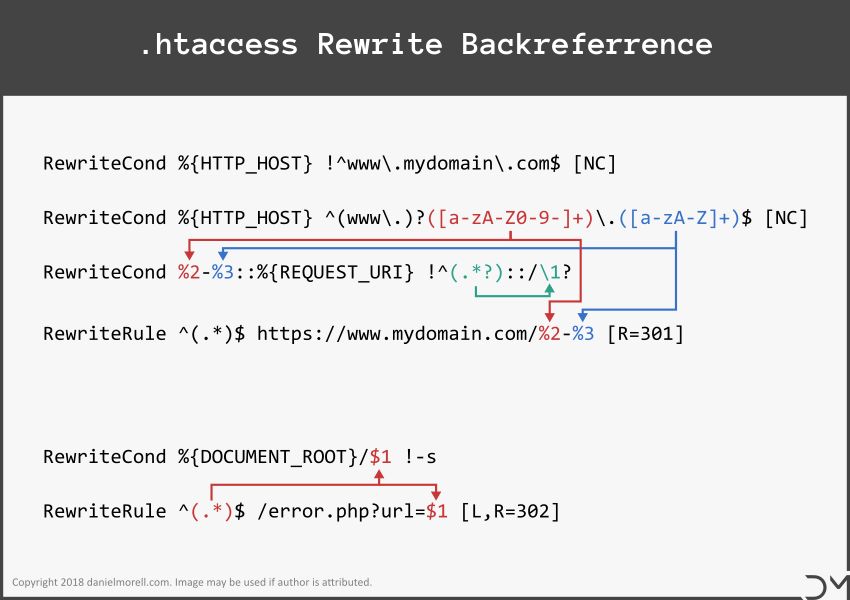
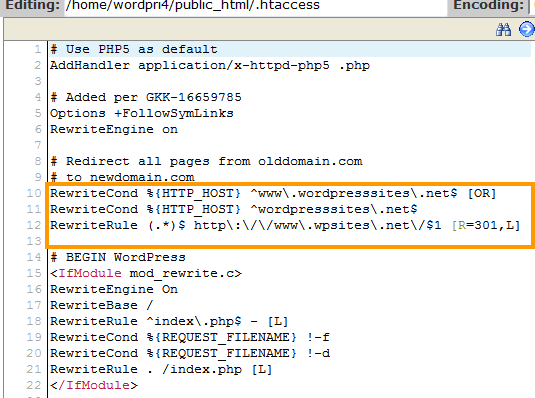
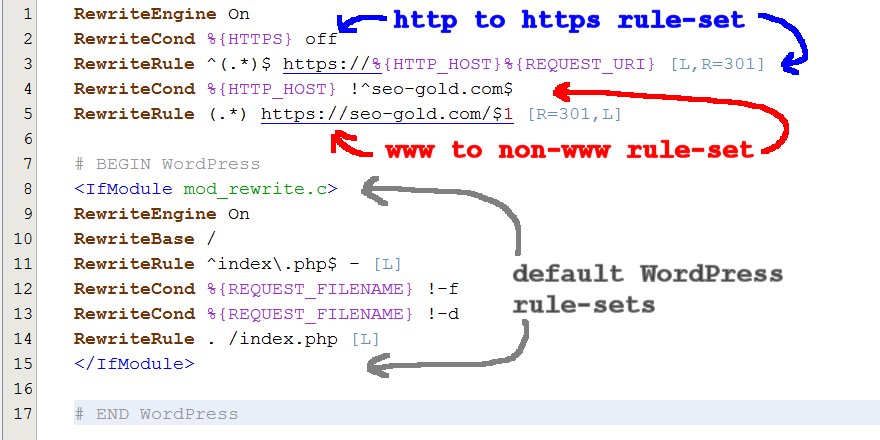
Example: How to Use the Htaccess Redirect Generator
Scenario
You want to permanently redirect an old page to a new page without losing SEO value.
Step-by-Step Example
-
Open the Htaccess Redirect Generator on SmallWebTools.
-
Select 301 Redirect (Permanent).
-
Enter the old URL path:
/old-page.html -
Enter the new destination URL:
https://example.com/new-page.html -
Click Generate Redirect.
Generated .htaccess Code Example
-
Copy the code.
-
Paste it into your website’s
.htaccessfile. -
Save and test the redirect.
Result Explained
-
Visitors are redirected instantly
-
Search engines transfer SEO value
-
No 404 errors occur
Your redirect is now live and SEO-safe.
Common Use Cases
-
Fixing broken links
-
Changing page URLs
-
Website redesigns
-
Domain migrations
-
HTTPS enforcement
-
SEO cleanup
The Htaccess Redirect Generator handles all of these efficiently.
Security and Redirects
Proper redirects also improve security by:
-
Enforcing HTTPS
-
Preventing duplicate content
-
Reducing phishing risks
The generator helps implement secure redirect rules correctly.
Why SmallWebTools Htaccess Redirect Generator Stands Out
SmallWebTools focuses on:
-
Simplicity
-
Accuracy
-
SEO best practices
-
Accessibility for all users
It’s designed for real-world website management.
Conclusion
The Htaccess Redirect Generator by SmallWebTools is a powerful, easy-to-use solution for creating SEO-friendly redirect rules without technical complexity. Whether you are fixing broken links, migrating a website, enforcing HTTPS, or cleaning up duplicate URLs, this tool ensures your redirects are correct, secure, and search-engine-optimized.
By eliminating manual coding errors and saving valuable time, the Htaccess Redirect Generator helps maintain rankings, improve user experience, and keep your website technically sound. Free, fast, and reliable, it is an essential tool for website owners, SEO professionals, and developers alike.